
- Catalogs
- Fritzmeier Umwelttechnik GmbH & Co. KG
- ISARIA Pro Active software

- Products
- Catalogs
- News & Trends
- Exhibitions
ISARIA Pro Active software
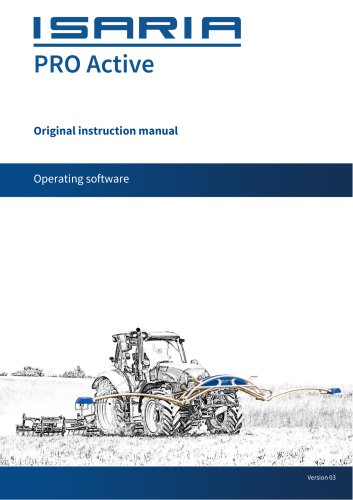
ISARIA Pro Active software
- Fundamentals: This manual is crucial for users and should be read and understood before using the product. It should be kept near the product for easy reference.
- Structure: The document includes cross-references for navigation and uses symbols to indicate hazards and important notes.
- Personnel Requirements: Operators must be at least 18 years old, trained, and aware of safety regulations. Only authorized personnel should operate the device.
- Workplace: The workplace must comply with regulations and be well-lit.
- Intended Use: The device is designed for determining crop growth status and optimizing crop management. Unauthorized modifications void the warranty.
- Safety Information: Includes risks such as crushing, sensor arm contact, tipping, obstructed vision, and road traffic hazards.
- Functional Principle: The ISARIA PRO Active uses sensors to determine crop nutrient conditions and optimize application products.
- ISARIA CONNECT: An online application for managing agricultural data, creating tasks, and analyzing measurements.
- Main Screen: Displays important controls and status messages, including options for moving sensor arms, starting tasks, and accessing the main menu.
- Main Menu: Provides access to help, settings, device management, and task management.
- Includes setting up WiFi, sensors, Bluetooth, GPS, application devices, and enabling licenses.
- Details on creating, starting, and stopping tasks, calibrating biomass thresholds, and moving sensor arms.
- Includes one-point mode, scan mode, application map, and expert systems.
- Guidance on determining software versions, fixing errors, and understanding status displays.
- Includes recommended slopes, growth stages, glossary, and declaration of conformity.
- Operating Mode Tile: Displays the current mode and sensor data. Users can adjust settings and view crop supply status.
- Application Amount Tile: Shows the current application amount, manual corrections, and yield potential if a map is assigned.
- Help: Provides terminal version and serial number information, and options for updates and exporting licenses.
- Settings: Includes sensor settings, time and language adjustments, WiFi setup, external GPS usage, license enabling, and biomass threshold calibration.
- Device Management: Allows adding, enabling/disabling, and editing application devices, and checking communication.
- Task Management: Manages open and completed tasks, with options to import/export tasks and edit task data.
Status and error notifications are displayed on the main screen, indicating GPS and sensor connections, USB detection, and WiFi status.
- WiFi Connection: Necessary for data transfer and live satellite map display. Requires network selection and password entry.
- Sensor Setup: Involves establishing Bluetooth connections and assigning sensor positions.
- External GPS Usage: Allows connection of an external GPS device with specific data set requirements.
- Application Device Setup: Involves adding devices, entering settings, and ensuring communication protocol compatibility.
- ILM Configuration: Communicates with ISOBUS application devices, requiring element number and configuration values.
- License Enabling: Requires a USB stick with license keys to enable expert systems.
- Task Management: Tasks contain parameters necessary for sensor-based systems and can be created in ISARIA CONNECT or via quick start. Tasks can be started, paused, or exited with specific options for continuation or completion.
- Biomass Threshold Calibration: Indicates the index value below which the system uses a manually set amount of fertilizer. Can be set manually or through calibration.
To calibrate the biomass threshold value, a representative subarea must be selected, and threshold value recording enabled. After sensor values are calculated, the threshold value is displayed and can be applied as the biomass threshold value.
Loading and Managing Task Data
Task data can be loaded via USB or ISARIA CONNECT, which requires a WiFi connection. Tasks must be in the OPEN TASKS category for ISARIA CONNECT. Importing/exporting tasks involves selecting tasks and choosing the appropriate import/export method.
Quick Start Function
The quick start function allows tasks to be initiated directly from the PRO Active terminal. It guides users through task creation based on the selected operating mode, such as One point mode, Scan mode, or Smart4Grass. Requirements include setting up the application device, knowing the growth stage, and fertilizing strategy.
Sensor Arm Movement
Sensor arms must be positioned 80-120 cm from the crop. The "Move sensor arms" dialog allows for automatic movement to transport position when traveling above 5 km/h. Manual movement is possible if software faults occur.
Distribution and Calibration
A calibration run is recommended for precise application amounts. Requirements include a connected sensor, GPS signal, and an active task. Calibration affects application amounts, and incorrect calibration must be reset.
Operating Modes
ISARIA system tasks require selecting an operating mode, such as One point mode, Scan mode, Application map mode, or Expert systems. Each mode has specific functions and requirements.
Troubleshooting
Common errors include mismatched application amounts and interrupted communication. Solutions involve checking parameters, connections, and power supply.
Appendix
Includes recommended slopes for fertilization, growth stages, and a glossary of technical terms. The glossary explains concepts like biomass index, N supply index, and fertilizing strategies.
The target amount is a key specification used to calculate the application amount of fertiliser. If sensor measurements match the mean value from calibration, the target amount is applied. Deviations lead to adjustments based on the fertilising strategy, such as balancing or growth-oriented approaches.
In automatic mode, the ISARIA system operates in one-point mode, requiring calibration. A mean value is calculated from sensor measurements, and a desired application amount is assigned. Minimum and maximum application amounts are specified, and a recommended slope is added, which can be adjusted. A control curve is generated to assign application amounts based on measurements, and it can be manually modified.
The ISARIA expert system determines the total application amount based on the crop's supply status. It applies fertiliser as needed to maintain optimum supply until the next application or harvest. The system uses pre-determined yield potential and quality parameters to assess supply levels.
This system does not require calibration and considers growth stage, yield potential, and quality direction. Optimum nitrogen uptake curves are saved for different usage directions, guiding fertilisation decisions.
Yield potential maps predict expected yields based on soil quality, crop history, and weather conditions. These maps, combined with sensor data, guide fertiliser application to achieve soil yield potential. In one-point mode, these maps act as correction maps, adjusting application amounts. Expert systems use them as target yield maps to calculate optimum nitrogen uptake.
Fritzmeier Umwelttechnik GmbH & Co. KG, Dorfstraße 7, 85653 Großhelfendorf, Germany. Phone: +49 8095 87339 0, Fax: +49 8095 87339 472, Website: www.isaria-digitalfarming.com, Email: [email protected]
Catalog excerpts
Original instruction manual Operating software
Open the catalog to page 1
We are glad you have opted for one of our products. We wish you flawless and successful operation. The distributing company is Fritzmeier Umwelttechnik under the product name ISARIA PRO Active, hereinafter called PRO Active. Any questions? We are looking forward to hearing from you. Fritzmeier Umwelttechnik GmbH & Co. KG Dorfstraße 7 85653 Großhelfendorf Germany Phone: +49 8095 87339 0 Fax: +49 8095 87339 472 www.isaria-digitalfarming.com [email protected] This instruction manual was originally written in German. The product may only be used in conjunction with the original instruction...
Open the catalog to page 2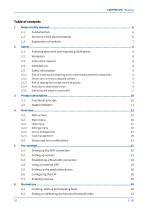
2.1 Selecting personnel and required qualifications 8 2.5.1 Risk of crushing and shearing due to electrically powered components 9 2.5.2 Sensor arm or sensor obstacle contact 9 2.5.3 Risk of tipping due to high centre of gravity 9 2.5.4 Risks due to obstructed vision 9 2.5.5 Safety hazard when in road traffic 9 4.3 Status and error notifications 21 5.1 Setting up the WiFi connection 22 5.3 Establishing a Bluetooth connection 24 5.5 Setting up the application device 26 6.1 Creating, starting and stopping tasks 30 6.2 Setting or calibrating the biomass threshold value 31
Open the catalog to page 3
6.3 Loading the task data 32 6.5 Moving the sensor arms 34 8.1 Determining the software version 37 8.2 Possible errors and how to fix them 37 8.3 Moving the sensor arms without the terminal 38 8.4 Status and error displays on the motor control 38
Open the catalog to page 4
Notes on this manual Notes on this manual Applicability The documentation is part of the product and applies to all persons who perform activities on the product. Before any activities are undertaken, the documentation must have been read and understood in its entirety. Instructions must be precisely complied with. Storage The documentation must be stored near to the PRO Active and must be accessible to the user at all times. Brand names and trademarks Product designations and/or company names listed in this document may be registered trademarks of the respective companies. The same also applies...
Open the catalog to page 6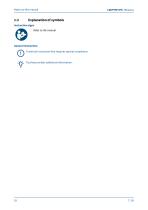
Notes on this manual Instruction signs Refer to the manual General instruction Technical instruction that requires special compliance. Tip that provides additional information.
Open the catalog to page 7
Persons working with the PRO Active must satisfy the following requirements: • They must be at least 18 years of age. • They must be adequately trained for the relevant activities. • They must be aware of and comply with relevant technical regulations and safety guidelines. The operating company will decide on the required qualifications for the personnel: • Operating personnel • Maintenance personnel • Repair personnel The operating company must ensure that only authorised personnel work on the PRO Active. Personnel to be trained, taught, instructed or personnel currently undergoing general...
Open the catalog to page 8
Safety information Risk of crushing and shearing due to electrically powered components Very high forces act on components moved by the linear actuators. There is a risk of injury and material damage. The PRO Active may only be operated if the operator can see the entire hazardous area and no persons or objects are inside it. Sensor arm or sensor obstacle contact Uneven surfaces, driving over bumps at speed and careless manoeuvring may cause one or both sensor arms to come into contact with the ground or an obstacle. The forces generated as a result may mechanically deform and rip off components....
Open the catalog to page 9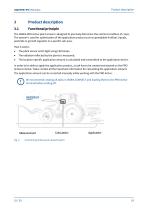
Product description The ISARIA PRO Active plant sensor is designed to precisely determine the nutrient condition of crops. The system is used for optimisation of the application product such as spreadable fertiliser, liquids, pesticide or growth regulator in a specific sub-area. • The plant sensor emits light using LED lamps. • The radiation reflected by the plants is measured. • The location-specific application amount is calculated and transmitted to the application device. In order to be able to apply the application product, a task has to be created and started on the PRO Active terminal....
Open the catalog to page 10
Product description Data for agricultural areas can be managed and visualised using the ISARIA CONNECT online application (http s://www. isaria-connect.com/®). ISARIA CONNECT provides the following main functions: • Plotting field boundaries • Creating and exporting tasks • Importing and analysing ISARIA measurements • Importing and managing yield potential maps Data is always loaded to the PRO Active terminal in the form of a task. Yield potential maps can be assigned to the tasks in ISARIA CONNECT. ISARIA CONNECT has been designed for use with the browsers Mozilla Firefox and Google Chrome....
Open the catalog to page 11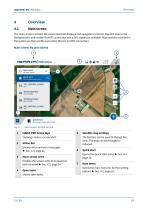
The main screen contains the most important displays and navigation controls. The GPS map in the background is only visible if a WiFi connection and a GPS signal are available. Map sections recorded in the system are then visible even when there is no WiFi connection. Main screen: No task started Open tasks __ Quick start Quick start Start measurement without task Fig. 2: Main screen: No task started
Open the catalog to page 12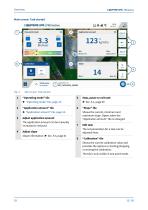
Main screen: Task started ISHRIH|PRO Active Application amount Relative supply status Under supply Normal supply Over supply . Field name Application run Fig. 3: Main screen: Task started
Open the catalog to page 13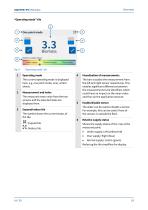
1 Operating mode The current operating mode is displayed here, e.g. one point mode, scan, winter wheat. The measured mean value from the two sensors and the selected index are displayed here. The symbol shows the current status of the tile. : Expand tile. : Reduce tile. The bars visualise the measurement from the left and right sensor respectively. This enables significant differences between the measurements to be identified, which could have an impact on the mean value and thus on the application amount. The slider can be used to disable a sensor. For example, this can be useful if one of the...
Open the catalog to page 14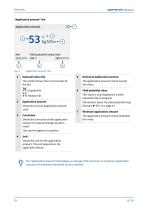
“Application amount” tile Application amount Yield potential value Max 106 % 200 kg N/ha (s) (!) Fig. 5: “Application amount” tile 5 Maximum application amount The application amount cannot exceed this value. 6 Yield potential value This value is only displayed if a yield potential map is assigned. Information about the yield potential map: Glossary ► Sec. 9.3, page 41 7 Minimum application amount The application amount cannot fall below this value. The “Application amount” tile displays a message if the minimum or maximum application amount or the biomass threshold value is reached.
Open the catalog to page 15All Fritzmeier Umwelttechnik GmbH & Co. KG catalogs and technical brochures
 ISARIA Pro Active Mechanics
31 Pages
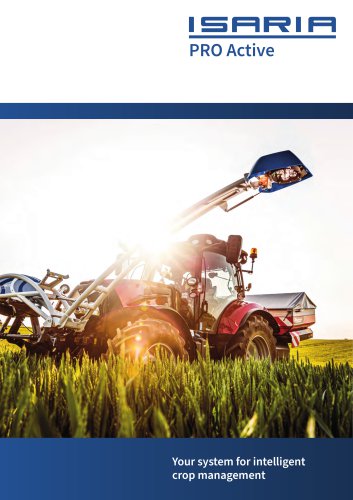 ISARIA PRO Active
12 Pages
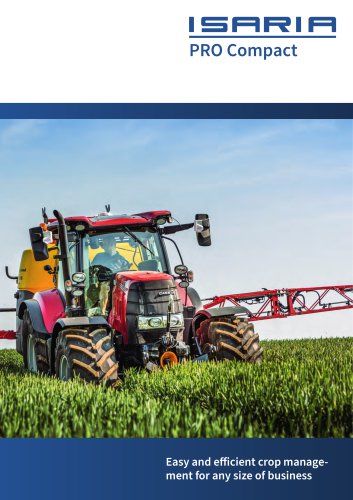 ISARIA PRO COMPACT
8 Pages
 ISARIA Connect
4 Pages
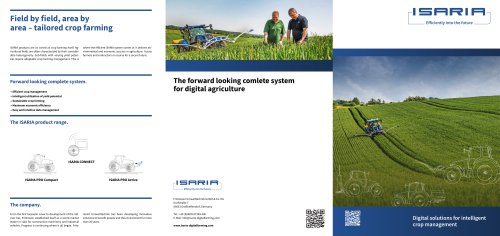 ISARIA System
2 Pages