
- Catalogs
- Genepro inc
- Vat Controller Instructions

Vat Controller Instructions

1 / 2 PagesView full catalog
Vat Controller Instructions
Product catalog summary
Operator's Manual Overview
This document is the operator's manual for the Vat Controller by GenePro, Inc. It provides instructions on how to operate, adjust, and troubleshoot the controller.
Controller Operation
- To change the set point (SP1), use the up or down arrow buttons. If SP1 cannot be changed, refer to the 'Unlocking the Controller' section.
- To display the current temperature, press both the up and down arrows simultaneously.
Adjusting the Operating Temperature
- To set a temperature other than the default 36.0°C, press the yellow button until 'SP1' is displayed.
- Use the up or down arrow to display and adjust the set point.
- The heater maintains the operating temperature, indicated by the illumination of 'O1'.
Unlocking the Controller
- If temperature adjustment is not possible, the controller may need to be unlocked.
- Press the yellow button until 'LocK' is displayed, then use the arrow buttons to display 'uSEr'.
- Press both arrow buttons to display the current temperature.
Auto-tuning the Controller
- Auto-tuning should be performed when the water jacket is full and at operating temperature.
- With the controller unlocked, press the left button until 'A-T' is displayed, then hold it until 'A-T' flashes. Wait until it stops flashing to complete the process.
Contact Information
- For service, call (877) 270-1250 or email [email protected].
This document is the operator's manual for the Vat Controller by GenePro, Inc. It provides instructions on how to operate, adjust, and troubleshoot the controller.
Controller Operation
- To change the set point (SP1), use the up or down arrow buttons. If SP1 cannot be changed, refer to the 'Unlocking the Controller' section.
- To display the current temperature, press both the up and down arrows simultaneously.
Adjusting the Operating Temperature
- To set a temperature other than the default 36.0°C, press the yellow button until 'SP1' is displayed.
- Use the up or down arrow to display and adjust the set point.
- The heater maintains the operating temperature, indicated by the illumination of 'O1'.
Unlocking the Controller
- If temperature adjustment is not possible, the controller may need to be unlocked.
- Press the yellow button until 'LocK' is displayed, then use the arrow buttons to display 'uSEr'.
- Press both arrow buttons to display the current temperature.
Auto-tuning the Controller
- Auto-tuning should be performed when the water jacket is full and at operating temperature.
- With the controller unlocked, press the left button until 'A-T' is displayed, then hold it until 'A-T' flashes. Wait until it stops flashing to complete the process.
Contact Information
- For service, call (877) 270-1250 or email [email protected].
See more
Catalog excerpts
Operator’s Manual GenePro, Inc. 6064 McKee Road Fitchburg, WI 53719 Phone: (877) 270-1250 Fax: (608) 270-1240 Email: [email protected]
Open the catalog to page 1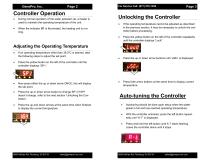
During normal operation of the water jacketed vat, a heater is used to maintain the operating temperature of the unit. Unlocking the Controller If the operating temperature cannot be adjusted as described in the previous section, it may be necessary to unlock the controller before proceeding. Press the yellow button on the left of the controller repeatedly until the controller displays ‘LocK.’ Press the up or down arrow buttons until ‘uSEr’ is displayed. Press both arrow buttons at the same time to display current temperature. When the indicator O1 is illuminated, the heating unit is running....
Open the catalog to page 2All Genepro inc catalogs and technical brochures
 Vat Assembly Manual
7 Pages


Related Searches
*Prices are pre-tax. They exclude delivery charges and customs duties and do not include additional charges for installation or activation options. Prices are indicative only and may vary by country, with changes to the cost of raw materials and exchange rates.
About AgriExpo
AgriExpo is a marketplace that offers B2B players a complete experience, from product sourcing to purchase. AgriExpo is an entity of VirtualExpo Group.
Are you a buyer?
Are you a supplier?