
- Catalogs
- HSK AQUA CULTUR
- VERTICAL TROUT INCUBATOR


VERTICAL TROUT INCUBATOR

VERTICAL TROUT INCUBATOR
To access your account, navigate to the login URL and enter your email address and password. Click 'Login' to proceed.
After logging in, click on 'Members Area' to manage your products.
In this section, you can add, delete, edit, and manage products. The management options include viewing/editing all listed products, managing product groups, sorting products, and restoring deleted products.
To add a product, include packaging details, minimum order price and units, and order processing time. Choose whether to display or hide the product from customers. Upload and publish the product once all details are entered.
Use the provided buttons to view, edit, duplicate, or manage existing products. You can also assign an owner, delete products, change product groups, and mark products as featured.
Products can be sorted and arranged by category or group. Use the search and filter options to organize the product showcase.
Add, edit, or delete product groups as needed.
Restore deleted products using the designated button.
Thank you for using the product posting guide.
Catalog excerpts

PRODUCT POSTING GUIDE
Open the catalog to page 1
LOG-IN TO YOUR ACCOUNT Login URL: https://www.tradewheel.com/login/ Enter your Email Address & Password and Click Login
Open the catalog to page 2
ENTER YOUR MEMBER'S AREA Click on Members Categories ^ Agriculture ^ Apparel m Automobiles It Beauty & Personal Care A Chemicals Buy Premium Consumer Electronics In Bulk At Wholesale Rates One Request, Multiple Quotes
Open the catalog to page 3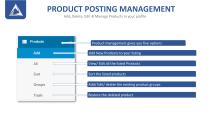
PRODUCT POSTING MANAGEMENT Add, Delete, Edit & Manage Products in your profile Product management gives you five options Add New Products to your listing View/ Edit all the listed Products Sort the listed products Add/ Edit/ delete the existing product groups Restore the deleted product
Open the catalog to page 4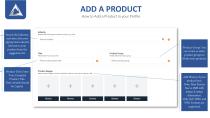
ADD A PRODUCTHow to Add a Product in your Profile Search the Industry, and select the most appropriate industry relevant to your product from the suggestion list. Product Title: Enter Your Complete Product Title. Note: Initials should be Capital. Product Group: You can create or select product groups to divide your products. Add Photos of your product here. Note: Max Picture Size is 2MB with 300px X 300px dimensions. Only JGP, JPEG and PNG Formats are supported.
Open the catalog to page 5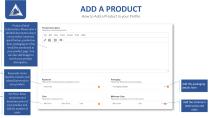
ADD A PRODUCTHow to Add a Product in your Profile Product Detail Information: Please enter a detailed description about your product (material, specification, production time, packaging etc) that would be mentioned in your product page. You can also add Images to enrich your product description.. Product Description 3lease enter ne product's ilessript on Edit View Insert Format Tool: Ta be Keywords: Enter Specific, Generic and related keywords to your product. 3lesse enter ne product keywords, separated by canma Please erter dels Is about products oackaghg Packaging Details Add the packaging...
Open the catalog to page 6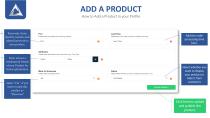
ADD A PRODUCT How to Add a Product in your Profile Add the order processing time here. Select whether you want to display your product or Hide it from customers Click here to upload and publish the product.
Open the catalog to page 7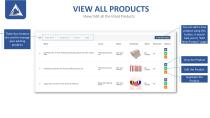
VIEW ALL PRODUCTS View/ Edit all the listed Products These four buttons are used to manage your existing products You can add a new product using this button, it would take you to “Add New Product” page View the Product Edit the Product Duplicate the Produc
Open the catalog to page 8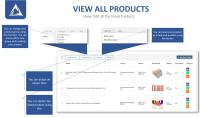
VIEW ALL PRODUCTS View/ Edit all the listed Products You can change your product group using this function. You can always add a new group while adding your product You can mark your product as a Featured product using this button You can assign an owner here You can delete the listed product using this
Open the catalog to page 9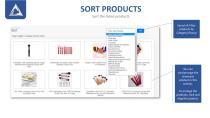
SORT PRODUCTS Sort the listed products Search & Filter products by Category/Group You can sort/arrange the showcase product in this section. To arrange the products, click and drag the product.
Open the catalog to page 10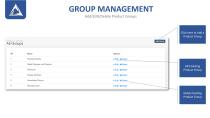
GROUP MANAGEMENT Add/Edit/Delete Product Groups Click here to Add a Product Group Edit Existing Product Group Delete Existing Product Group
Open the catalog to page 11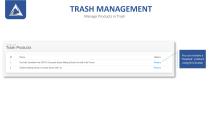
TRASH MANAGEMENT Manage Products in Trash Hot Sale Synthetic Hair 20PCS Cosmetic Brush Makeup Brush Set with Fold Pouch You can restore a "Deleted" product using this button Golden Makeup Brush Cosmetic Brush with Jar
Open the catalog to page 12
-Global Tradi
Open the catalog to page 13All HSK AQUA CULTUR catalogs and technical brochures
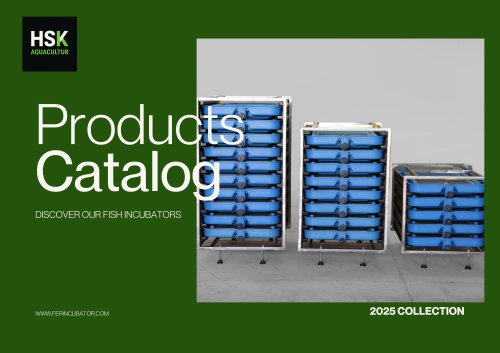 Fish Incubator
6 Pages