
- Catalogs
- ren cocorp
- SONO-GRADER®

SONO-GRADER®

SONO-GRADER®
Catalog excerpts

SONO-GRADER USER’S GUIDE MODEL 2 MANUAL VERSION 4.7a CODE VERSION 4.6
Open the catalog to page 1
THIS PAGE FOR YOUR NOTES
Open the catalog to page 2
SONO-GRADER® User’s GUIDE
Open the catalog to page 3
SONO-GRADER® User’s GUIDE GENERAL OVERVIEW Please take the time to study this manual! The SONO-GRADER® is a highly versatile product, but it cannot do what you want, until you tell it what you want. The RENCO SONO-GRADER is a microprocessor-based battery operated data acquisition device. Though its primary application is for use with swine, it can also be used with certain other mammals. It utilizes A-Mode ultrasonic technology to measure backfat and loin muscle depth and also for pregnancy detection. Data storage capacity is 2,000 animals. Data can be transferred either to a computer or printer....
Open the catalog to page 4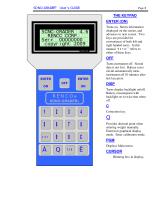
SONO-GRADER® User’s GUIDE SONO - GRADE R 4.6 RENCO CORP . S e r# 00000000 copyr i ght 2009 MADE IN USA Turns on. Stores information displayed on the screen, and advances to next screen. Two keys are provided for convenience of both left and right handed users. In this manual, “ENTER” refers to either of these keys. DISP Turns display backlight on/off. Battery consumption with backlight on is twice that when off. Turns instrument off. Stored data is not lost. Battery saver circuit automatically turns instrument off 10 minutes after last key press. Q Provides decimal point when entering weight...
Open the catalog to page 5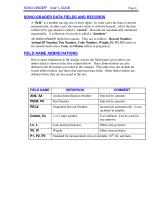
SONO-GRADER® User's GUIDE Page 4 SONO-GRADER DATA FIELDS AND RECORDS A “field” is a number having one or more digits. In some cases the data is entered automatically, in other cases the operator enters it with the keypad. All of the data collected for one animal is called a “record”. Records are automatically numbered sequentially. A collection of records is called a “database”. All SONO-GRADER fields have names. They are as follows: Record Number, Animal ID Number, Pen Number, Code Number, Weight, P1, P2, P3 (refers to fat measurement sites), Loin, and Status (refers to pregnancy). FIELD NAME...
Open the catalog to page 6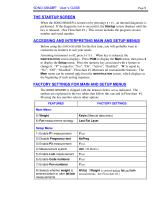
SONO-GRADER® User's GUIDE Page 5 THE STARTUP SCREEN When the SONO-GRADER is turned on by pressing ENTER, an internal diagnostic is performed. If the diagnostic test is successful, the Startup screen displays until the key is released. (See Flowchart #1.) This screen includes the program version number and serial number. ACCESSING AND INTERPRETING MAIN AND SETUP MENUS Before using the SONO-GRADER for the first time, you will probably want to customize its features to suit your needs. Assuming instrument is off, press ENTER. When key is released, the identification screen displays. Press PGM to...
Open the catalog to page 7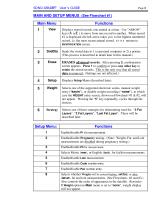
SONO-GRADER® User's GUIDE Page 6
Open the catalog to page 8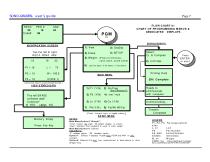
SONO-GRADER® user's guide Page 7 FLOWCHART #1 CHART OF PROGRAMMING MENUS & ASSOCIATED DISPLAYS IDENTIFICATION SCREEN Top line left to right: REC#, PEN#, AN# 19 16 23 5) Weight: (Press for Choices: none, keyin, scale name) 6) Last fat layer / 3 fat layers / 2 fat layers (Use arrow keys to cycle through records.) VIEW STORED DATA ^^mmuncating” (Press numeric keys to toggle values. ) SETUP MENU Memory Empty Press Any Key NOTES: Main MenuOption 5,"Weight": "none" means no_ scale. No weight display is shown. "keyin" indicates that keyboard is used to enter weight. Main Menu Option 6: Seetext. Setup...
Open the catalog to page 9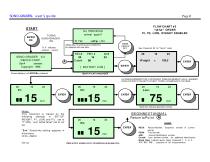
SONO-GRADER® user's guide Page 8 FLOW CHART #2 "wt/fat" ORDER P1, P3, LOIN, WEIGHT ENABLED See Flowchart #3 for "fat/wt" order Black box indicates good skin contact. Notes: This flowchart is based on the following settings in SETUP: WEIGHT, P1, LOIN, and P3, set to "Y" (ON), and "wt/fat,fat/wt" set to wt/ fat. " S=x" Sensitivity setting appears in al l screens. Units = Metric BEGIN NEXT ANIMAL Return to Point (A) LEGEND REC#: Record Number. Sequence number of current AN# : Animal Identification number. Code#: User defined number for additional identification. Data within screens is for illustrative...
Open the catalog to page 10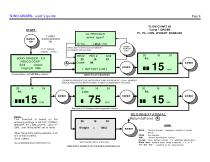
SONO-GRADER® user's guide Page 9 FLOW CHART #3 "fat/wt" ORDER P1, P3, LOIN, WEIGHT ENABLED SONO-GRADER X.X RENCO CORP. Ser# xxxxxxxx Copyright 1996 Notes: This flowchart is based on the following settings in SETUP: CODE#, WEIGHT, P1, LOIN, and P3, set to "Y" (ON), and "wt/fat,fat/wt" set to fat/wt. "S=x" Sensitivity setting appears in all loin and fat screens. Units = Metric f lo3. vsd©2005RE NCOCO RPO RAT IO N BEGIN NEXT ANIMAL Return to Point A LEGEND Sequence number of current See Flowchart #2 for wt/fat order Data within screens is for illustrative purposes only. Record Number. animal. PE...
Open the catalog to page 11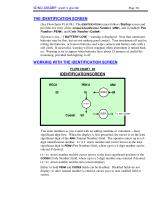
SONO-GRADER® user’s guide THE IDENTIFICATION SCREEN (See Flowcharts #1 & #4.) The IDENTIFICATION screen follows Startup screen and provides for entry of the Animal Identification Number (AN#), and if enabled, Pen Number (PEN#), and Code Number (Code#). If power is low, “[BATTERY LOW[” warning is displayed. Note that sometimes batteries may be fine, but are not making good contact. Turn instrument off and try rolling the batteries, or remove batteries and wipe contacts and battery ends with a soft cloth. If successful, warning will not reappear when instrument is turned back on. Warning is set...
Open the catalog to page 12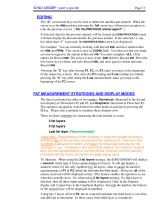
SONO-GRADER® user’s guide EDITING The “C” (correction key) can be used to delete the number just entered. When the cursor in at the AN# position, pressing the left arrow key will present an option to redo the previous record. (“Do the PREVIOUS animal again?”.) If selected, data for the previous animal, will be cleared and IDENTIFICATION screen will then display the Record number for previous animal. If not selected, i.e. any key other than “1” is pressed, the IDENTIFICATION screen is re-displayed. For example: You are currently working with Record #50, and have entered data for AN# and PEN#....
Open the catalog to page 13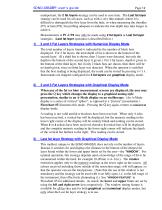
SONO-GRADER® user’s guide unimportant, the 2 fat layers strategy can be used to save time. The Last fat layer strategy can be used for all cases, such as with a very thin animals where it is difficult to distinguish the first layer from the hide, or when measuring the shoulder (P1) or ham (P3), but probing adequate to indicate the true depth may take longer to achieve. Measurements at P1 & P3 may only be made using 2 fat layers or Last fat layer strategies. (Last fat layer operation is described below.) 1) 2 and 3 Fat Layers Strategies with Numerical Display Mode The total number of layers found...
Open the catalog to page 14All Ren cocorp catalogs and technical brochures
 LEAN-MEATER ®
3 Pages
 PREG-ALERT PRO® INSTRUCTIONS
13 Pages
 Preg-Tone®
2 Pages
