


1400 V QUICK REFERENCE GUIDE

1400 V QUICK REFERENCE GUIDE
- Hydraulics: Connect the red pipe for supply (35-40 lpm) and the blue pipe for free flow return.
- Electrics: Connect the 12V supply to the 3-pin plug, attach the wrapper harness to the controller, and connect the hand remote to the controller.
- Switch on the controller using the red switch.
- Enter the Auto Park Sequence by pressing the down arrow, then Enter, and hold the Unfold drawbar button until 'End' is displayed.
- Install two rolls of film.
- Set the Auto Load paddle into the working position if using Auto Load.
- Drive into the bale until the Auto load paddle contacts it. The bale will be loaded, wrapped, and unloaded automatically.
- In Auto mode, press the 'Load up' button on the remote or controller to load the bale, then press 'Auto start' to begin wrapping, and 'Offload' to offload the bale.
- Remove the two rolls of film and place them on the film roll holders.
- Enter the Auto Park Sequence by pressing the down arrow, then Enter, and hold the Fold Drawbar button until 'End' is displayed.
- Manual Mode (M): Table down, Loadarm out, Table up, Loadarm in.
- Auto Mode (A): Start autounloading, Start autowrap, Start autoloading.
Guidelines for bale diameter and number of wraps: 120 cm requires 16, 24, or 32 wraps for 4, 6, or 8 layers respectively; 150 cm requires 20, 30, or 40 wraps.
- Display shows current and target number of wraps, wrapping speed, bale total, grand total number of bales, and mode (Manual or Auto).
- Functions include unfolding/folding drawbar, opening/closing C&S, fast/slow wrap forward, adding extra wrap, unloading bale, starting automatic wrapping cycle, and selecting operating mode.
- Required for static operation of the 1400V wrapper.
- Includes functions for auto start wrap, close/open cut & start, offload bale, emergency stop, and rotating wrap arms.
- The red button on the rear of the remote must be pressed while pressing any other button except 'STOP'.
Catalog excerpts
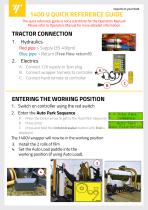
1400 V QUICK REFERENCE GUIDE The quick reference guide is not a substitute for the Operators Manual! Please refer to Operators Manual for more detailed information Red pipe > Supply (35-40lpm) Blue pipe > Return (Free flow return!!) A. Connect 12V supply to 3pin plug B. Connect wrapper harness to controller C. Connect hand remote to controller ENTERING THE WORKING POSITION 1. Switch on controller using the red switch 2. Enter the Auto Park Sequence A. Press the Down arrow to get to the Auto Park Sequence B. Press Enter C. Press and hold the Unfold drawbar button until End is displayed. The 1400V wrapper will now be in the working position 3. Install the 2 rolls of film 4. Set the Auto Load paddle into the working position (if using Auto Load). 3 4
Open the catalog to page 1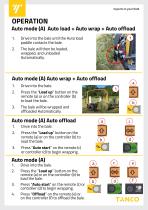
Auto mode (A) Auto load + Auto wrap + Auto offload 1. 2. Drive into the bale until the Auto load paddle contacts the bale. The bale will then be loaded, wrapped, and unloaded Automatically. Auto mode (A) Auto wrap + Auto offload 1. Drive into the bale. Press the “Load up” button on the remote (a) or on the controller (b) to load the bale. The bale will be wrapped and offloaded Automatically. Auto mode (A) Auto offload 1. Press the “Load up” button on the remote (a) or on the controller (b) to load the bale. Press “Auto start” on the remote (c) or controller (d) to begin wrapping. Drive into the...
Open the catalog to page 2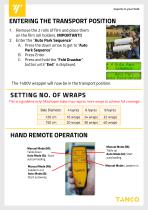
ENTERING THE TRANSPORT POSITION 1. Remove the 2 rolls of film and place them on the film roll holders. IMPORTANT!! 2. Enter the “Auto Park Sequence” A. Press the down arrow to get to “Auto Park Sequence” B. Press Enter C. Press and hold the “Fold Drawbar” button until “End” is displayed. The 1400V wrapper will now be in the transport position. This is a guideline only! Misshapen bales may require more wraps to achieve full coverage . Bale Diameter HAND REMOTE OPERATION Manual Mode (M): Table down Auto Mode (A): Start autounloading Manual Mode (M): Loadarm out Auto Mode (A): Start autowrap Manual...
Open the catalog to page 3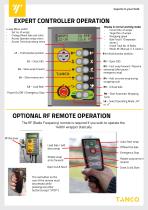
EXPERT CONTROLLER OPERATION Display in normal working mode: Current No. of wraps Target No. of wraps Wrapping speed Bale Total ( 10 seperate stores ) Grand Total No. of Bales Mode: M ( Manual ) / A ( Auto ) 4-way Menu switch Set no. of wraps Change/Reset bale sub-total Access Operator setup menu Access Technician setup menu L1 – Fold drawbar position R1 Unfold drawbar position R2 – Open C&S R3 – Fast wrap forward / Resume autowrap (after pause / emergency stop) L3 – Slow wrap forward L4 – Slow reverse arm R4 – Add an extra wrap during wrapping cycle Power On/Off / Emergency Stop R6 – Start Automatic...
Open the catalog to page 4All Tanco catalogs and technical brochures
 280 CS OPERATORS HANDBOOK
38 Pages
 A100 J QUICK REFERENCE GUIDE
4 Pages
 I70 - Bale Shear
25 Pages
 S100 A QUICK REFERENCE GUIDE
4 Pages


- Mower
- Mounted mower
- PTO-driven mower
- Flail mower
- Bale gripper
- Round bale gripper
- Bale spear
- Mower-conditioner
- Bale wrapper
- Round bale wrapper
- Rear-mount mower
- Front mower
- Individual bale wrapper
- Folding mower
- Automatic bale wrapper
- Square bale gripper
- Screening shovel bucket
- Towed bale wrapper
- High-capacity shovel bucket
- Rectangular bale grab