- Catalogs
- Winmate Inc.
- W24L100-MRA1FP

W24L100-MRA1FP

W24L100-MRA1FP
The device requires a 24V DC input with isolation, accepting a range of 9 to 36V.
The 24” marine display features a 1920 x 1080 resolution with a projective capacitive multi-touch screen. It has an edge-to-edge narrow bezel design and a fanless cooling system. The display is color calibrated for ECDIS compliance and supports DAY, DUSK, and NIGHT mode switching. It meets industrial marine standards including IEC60945 4th Edition, DNVGL-CG-0339, and IACS E10.
The dimensions are 595mm x 385mm x 63.8mm with an anodized aluminum bezel. It has an IP66 rating on the front side and supports panel and VESA mounting. Certifications include DNVGL-CG-0339, IEC60945 4th, IACS E10, CE, and FCC.
The device features OSD control via programmable capacitive touch keys and remote control via RS232 serial interface. It is designed to withstand anti-vibration (0.7g@DNVGL CG-0339 Class A) and anti-shock (15G, 11ms duration).
Operating temperature ranges from -15 to 55 degrees Celsius with humidity levels from 5% to 95% (non-condensing).
The display has a resolution of 1920 x 1080, a pixel pitch of 0.276mm, a contrast ratio of 5000:1, and a brightness of 350 cd/m2. It offers a viewable angle of 89° in all directions and supports 16.7 million colors.
The device includes a projective capacitive multi-touch screen with optional AR protection glass.
The device includes USB for touchscreen, RS232 for remote control, HDMI 1.4, DVI-D, VGA, and a DC input. Only 24V DC input is approved by the DNVGL certificate.
The device includes capacitive touch keys for ECDIS, Home, Brightness, and Power functions, and a buzzer with a sound level of 75 dB to 80 dB at 2300 Hz.
Catalog excerpts
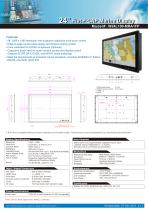
Flat P-CAP Marine Display 24” Flat P-CAP Marine Display • 24” 1920 x 1080 resolution with projective capacitive multi-touch screen • Edge-to-edge narrow bezel design and fanless cooling system • Color calibrated for ECDIS compliance (Optional) • Capacitive touch keys for quick function access and display control (Support ECDIS DAY, DUSK, and NIGHT mode switching) • Meet the requirements of Industrial marine standards, including IEC60945 4th Edition, DNVGL-CG-0339, IACS E10 1. USB (touchscreen) 2. RS232 (remote control) 3. HDMI 1.4 4. DVI-D Capacitive Touch Keys (ECDIS, Home, Brightness(+,-), Power) * N o t e: this is a simplified drawing and some components are not marked in detail. *Please contact our sales representative if you need further product information. Display Specifications User Controls: Resolution Pixel Pitch Contrast Ratio Brightness Viewable Angle Active Display Area Max Colors Touch Screen OSD control via programmable capacitive touch keys (ECDIS, Home, Brightness(+,-), Power) Remote control via RS232 serial interface 1920 x 1080 0.276 (H) x 0.276 (V) mm 5000:1(typ.) 350 cd/m2 (typ.) 89°/89°/89°/89° (typ.) (Up/Down/Left/Right) 531.36 (H) x 298.89 (V) mm 16.7 M colors, 8 bits/color Projective Capacitive Multi-touch (Optional AR Protection Glass) Mechanical Mechanical Mounting Dimension Panel Mount Cutout Housing IP Rating Input / Output Connectors Operating Temperature Operating Humidity Anti-Vibration Anti-Shock Panel Mount , VESA Mount 595mm x 385mm x 63.8mm 572mm x 363mm Anodized Aluminum Bezel IP66 (Front Side) -15 to 55 deg.C 5% to 95% (non condensing) 0.7g@DNVGL CG-0339 (Class A) 15G,11ms duration DVI input : DVI-D 24pin (female) HDMI input : 1 x HDMI 1.4 VGA input : D-SUB 15pin (female) Remote control via RS232 : D-SUB 9pin (female) Touch : USB type A (female) DC input : Terminal block 3pin (phoenix type) Power Specifications Power Input : *24V DC-in with Isolation (9~36V acceptable) *Only 24V DC have approval by DNVGL certificate Note: All Specifications are subject to change without prior notic
Open the catalog to page 1All Winmate Inc. catalogs and technical brochures
 FM10EV
3 Pages
 FM07E
FM07E2 Pages
 FM10QV
3 Pages
 M116TG
3 Pages
 EAC PRO-IK90
2 Pages
 FM10A
FM10A2 Pages
 M101BK
2 Pages
 FM10Q
FM10Q2 Pages
 M700D
M700D1 Page
 M101B Standard
1 Page
 M9020
M90201 Page
 W26L100-MRA1FP
1 Page
 R08L100-MLU1
2 Pages
 R17L100-RKA1ML
1 Page
 R19L100-MLM1
1 Page
 M320TF-MIL
2 Pages
 M270TF-MIL
2 Pages
 R19L300-MRA1FP
1 Page
 R15L600-MRA3FP
1 Page
 R12ID8M-RTM7CA
1 Page
 R10IH8M-RTT2GP
1 Page
 Battery Charger
1 Page
 VESA Mounting kit
1 Page
 M270TF
12 Pages
 R15ID3S-65EX
1 Page
 Full IP67 Chassis LCD
2 Pages
 Full IP65 Chassis LCD
2 Pages
 10.4” Rugged Tablet PC
1 Page
 Vehicle Power Adapter
1 Page
 S430 Series
1 Page
 VMDS-08
1 Page
 MFD-08
1 Page
 Network Player Gold (HD)
2 Pages
 Rugged Panel PC
1 Page
 MX30
MX301 Page
 PDA Accessories
1 Page
 IC70 BOX PC
1 Page
 R15IC7T-PMC3HB
1 Page
 I330-Rugged BOX PC
1 Page
 FA30SB3-210
1 Page